
Our Short List of 3

- Best for: Buyers who want a tough, well-rounded 4060 laptop with a color-accurate screen.
- 15.6-inch Full HD 144Hz display with 100% sRGB coverage
- AMD Ryzen 7 7735HS processor, up to 4.7 GHz
- NVIDIA GeForce RTX 4060 Laptop GPU at 140W Max TGP
- 16GB DDR5-4800MHz memory
- Best for: Players who stream, multitask heavily, or keep dozens of tabs open while gaming.
- 15.6-inch Full HD (1920 x 1080) IPS display, 144Hz, 100% sRGB, 300 nits
- AMD Ryzen 7 7435HS processor, 8 cores, up to 4.5 GHz
- NVIDIA GeForce RTX 4060 graphics, 8GB GDDR6
- 32GB DDR5 RAM

- Best for: Competitive players who value the fastest screen here and a clear upgrade path.
- 15.6-inch Full HD IPS display, 165Hz refresh rate
- Intel Core i7-13620H processor
- NVIDIA GeForce RTX 4050 Laptop GPU, 6GB GDDR6
- 16GB DDR5 memory, 2 slots, maximum 32GB
All 3 Picks at a Glance
| Product | Specs | Action |
|---|---|---|
| ASUS TUF Gaming A15 (FA507NV-EH74) |
| Check price on Amazon |
| Lenovo LOQ 15 (15ARP9) |
| Check price on Amazon |
| Acer Nitro V 15 (ANV15-52-76NK) |
| Check price on Amazon |
Key takeaways
- Compare four mid-range gaming laptops with RTX 4050 and 4060 graphics, fast screens and 16GB of memory, and find the one that fits how you play.
What's inside
As an Amazon Associate I earn from qualifying purchases. This post may contain affiliate links at no extra cost to you.
Choosing a mid-range gaming laptop is a decision about balance, not raw power. The graphics card has to be strong enough to run current games smoothly at the resolution of the built-in screen, while the processor, memory and storage have to keep up without turning the machine into a loud, hot slab. Go too cheap and you end up with a flashy GPU starved by too little memory or a dim, slow screen. Go too far up the range and you pay for flagship silicon your games will never fully use.
This guide is for first-time buyers, students replacing an aging laptop, and anyone who wants one machine for both play and everyday work. Every laptop below was picked from its Amazon listing by checking the graphics card, processor, memory, storage and display together, so each one earns its place as a complete package rather than a single impressive specification.
Quick Picks
As an Amazon Associate we earn from qualifying purchases.
| Product | Best for | Key spec from title |
|---|---|---|
| ASUS TUF Gaming A15 (FA507NV-EH74) | Durable all-round gaming with a color-accurate screen | RTX 4060, Ryzen 7 7735HS, 16GB DDR5, 1TB SSD |
| Lenovo LOQ 15 (15ARP9) | Heavy multitasking with the most memory here | RTX 4060, Ryzen 7 7435HS, 32GB DDR5, 1TB SSD |
| HP Victus 15 (15-FA1657) | Gaming plus office work on Windows 11 Pro | RTX 4060, Core i7-13620H, 16GB RAM, 1TB SSD |
| Acer Nitro V 15 (ANV15-52-76NK) | Fast competitive play on a 165Hz display | RTX 4050, Core i7-13620H, 16GB DDR5, 1TB SSD |
How to Choose
Start with the graphics card
The GPU sets the ceiling for everything else in a mid-range gaming laptop. In this segment you will mostly meet the GeForce RTX 4050 and RTX 4060, both built on the same Ada Lovelace architecture. The 4060 carries more video memory and more processing cores, which helps in demanding titles and ray-traced scenes, while the 4050 still handles most current games well at the 1080p resolution these screens use. Pick the 4060 when you play newer, graphically heavy games or want extra headroom for the years ahead. Pick the 4050 when the rest of the laptop is stronger, because a 4050 with enough memory and a good screen beats a 4060 held back by weak supporting parts.
Match the processor and memory to the GPU
A mid-range GPU deserves a mid-range processor and at least 16GB of memory, and this is where cheaper configurations quietly cut corners. The Ryzen 7 7000-series and Core i7-13620H chips in this guide all have enough cores to keep a 4050 or 4060 fed, so the CPU is rarely the bottleneck. Memory matters more: 8GB is no longer enough for modern games running alongside a browser and a chat app, and it forces the system to lean on the drive. Look for 16GB as the floor, two memory slots rather than soldered memory, and a listing that states the maximum supported memory, because an upgrade path keeps a good laptop useful for years.
Read the screen specs, not just the size
Every laptop here has a 15.6-inch Full HD screen, but that sentence hides the differences that matter. Refresh rate decides how smooth motion looks, so 144Hz or 165Hz is a genuine step up from a 60Hz panel for fast games, and it makes everyday scrolling feel smoother too. Panel type matters as well: an IPS panel keeps colors and contrast steady when you view it from an angle, which is how most people actually sit with a laptop. Color coverage is worth checking if you also edit photos or video, and brightness decides whether the screen stays readable in a bright room, so read the full display line in the listing rather than stopping at the diagonal measurement.
Storage, cooling and ports decide daily life
A gaming laptop lives or dies on the parts you touch every day, and storage is the first of them. A 512GB drive fills fast once a few modern games are installed, so 1TB is the sensible starting point, and a PCIe Gen 4 drive loads games quicker than a Gen 3 one. Cooling is the second: a laptop that throttles under load loses the performance you paid for, so look for dual fans, rear vents and a listing that mentions a dedicated cooling design. Ports are the third, because an HDMI output, an Ethernet jack and a mix of USB-A and USB-C connections decide whether the laptop works as a desktop replacement without extra adapters.
The 4 Best Options
ASUS TUF Gaming A15 (FA507NV-EH74)
- Best for: Buyers who want a tough, well-rounded 4060 laptop with a color-accurate screen.
- 15.6-inch Full HD 144Hz display with 100% sRGB coverage
- AMD Ryzen 7 7735HS processor, up to 4.7 GHz
- NVIDIA GeForce RTX 4060 Laptop GPU at 140W Max TGP
- 16GB DDR5-4800MHz memory
Buyers who want a tough, well-rounded 4060 laptop with a color-accurate screen.
The listing is for the 2023 model, so confirm the exact model number FA507NV-EH74 on the product page before ordering, and check the current availability on Amazon, since older configurations can sell through.
The TUF A15 is the rugged all-rounder of this group, built around a Ryzen 7 7735HS and an RTX 4060 running at a 140W maximum graphics power, which is on the generous side for a laptop GPU. Its 15.6-inch Full HD display runs at 144Hz with full sRGB coverage, so games look fluid and colors stay true when you switch from playing to editing photos. A MUX switch with Advanced Optimus routes frames directly from the dedicated GPU to the screen, which lifts gaming performance without any manual fiddling, and the military-grade chassis is made to survive being carried around every day.
Watch out for: The listing is for the 2023 model, so confirm the exact model number FA507NV-EH74 on the product page before ordering, and check the current availability on Amazon, since older configurations can sell through.
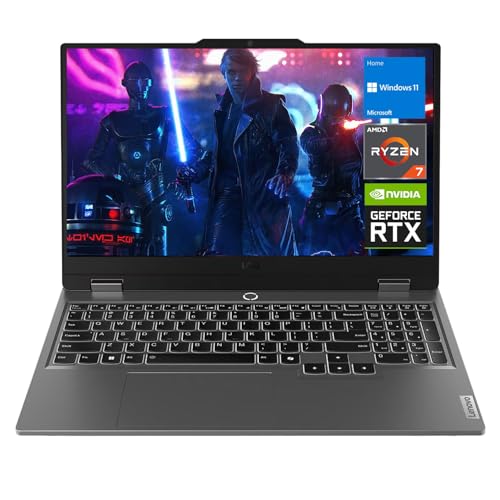
Lenovo LOQ 15 (15ARP9)
- Best for: Players who stream, multitask heavily, or keep dozens of tabs open while gaming.
- 15.6-inch Full HD (1920 x 1080) IPS display, 144Hz, 100% sRGB, 300 nits
- AMD Ryzen 7 7435HS processor, 8 cores, up to 4.5 GHz
- NVIDIA GeForce RTX 4060 graphics, 8GB GDDR6
- 32GB DDR5 RAM
Players who stream, multitask heavily, or keep dozens of tabs open while gaming.
The 32GB memory figure comes from this Amazon listing, while Lenovo’s own manual for the 15ARP9 base model describes 16GB, so this configuration appears to be seller-upgraded; confirm the exact memory and the bundled cooler on the product page before ordering.
The LOQ 15 stands out because its listing pairs the RTX 4060 with 32GB of DDR5 memory, double what the other laptops here carry, which leaves plenty of room for games, streaming software and browser tabs running at once. The Ryzen 7 7435HS has eight cores, and the 15.6-inch Full HD IPS display runs at 144Hz with full sRGB coverage and 300 nits of brightness, a combination that covers both fast games and color-sensitive work. Three USB-A ports, a USB-C port with DisplayPort, HDMI and Ethernet give it the fullest connectivity in this guide, and the listing even bundles a folding laptop cooler.
Watch out for: The 32GB memory figure comes from this Amazon listing, while Lenovo’s own manual for the 15ARP9 base model describes 16GB, so this configuration appears to be seller-upgraded; confirm the exact memory and the bundled cooler on the product page before ordering.
HP Victus 15 (15-FA1657)
The Victus 15 is the sensible pick for someone who needs one laptop for both games and work, because it ships with Windows 11 Pro rather than Home and pairs a Core i7-13620H with the RTX 4060. Its 15.6-inch Full HD display runs at 144Hz, the 1TB NVMe drive leaves room for a serious game library, and the backlit keyboard, webcam, USB Type-C port and Wi-Fi 6 cover the basics of video calls and desk setups without fuss. HP’s Victus line is deliberately understated next to flashier gaming brands, which makes this one easier to carry into a classroom or an office.
Specs
- 15.6-inch Full HD display, 144Hz refresh rate
- Intel Core i7-13620H processor, 10 cores and 16 threads, up to 4.9 GHz
- NVIDIA GeForce RTX 4060 graphics, 8GB GDDR6
- 16GB RAM
- 1TB NVMe SSD
- Backlit keyboard and webcam
- USB Type-C port and Wi-Fi 6
- Windows 11 Pro
Best for: Students and workers who need a gaming laptop that also fits in professional settings.
Watch out for: The memory type is described differently across sources, with HP’s own specification for this model listing DDR4 while the Amazon listing describes DDR5, so check the memory details on the product page and confirm the current availability before ordering.
Acer Nitro V 15 (ANV15-52-76NK)
- Best for: Competitive players who value the fastest screen here and a clear upgrade path.
- 15.6-inch Full HD IPS display, 165Hz refresh rate
- Intel Core i7-13620H processor
- NVIDIA GeForce RTX 4050 Laptop GPU, 6GB GDDR6
- 16GB DDR5 memory, 2 slots, maximum 32GB
Competitive players who value the fastest screen here and a clear upgrade path.
The RTX 4050 has 6GB of video memory, so very demanding titles may need lowered texture settings, and the listing has shown only a small number of offers, so confirm availability on the product page before ordering.
The Nitro V 15 is the entry point of this group, pairing the RTX 4050 with a Core i7-13620H, 16GB of DDR5 memory and a 1TB Gen 4 SSD, which is a balanced combination for current games at 1080p. Its 15.6-inch Full HD IPS display runs at 165Hz, the fastest refresh rate here, so fast-paced shooters and racing games feel noticeably smoother than on a 144Hz panel. A Thunderbolt 4 port is a rare bonus at this level, opening the door to high-speed docks and external displays, and the two DDR5 slots support up to 32GB if you decide to upgrade later.
Watch out for: The RTX 4050 has 6GB of video memory, so very demanding titles may need lowered texture settings, and the listing has shown only a small number of offers, so confirm availability on the product page before ordering.
Which One Fits Your Situation
You want the strongest all-rounder for modern games
Pick the Lenovo LOQ 15. The RTX 4060 handles demanding titles, and the 32GB of memory in this listing means the laptop keeps its composure when you run a game, a voice chat and a browser at the same time. The full set of ports, including Ethernet and HDMI, also makes it the easiest of the four to turn into a desktop setup.
You need one laptop for work, study and play
Pick the HP Victus 15. Windows 11 Pro, the understated design and the solid Core i7 and RTX 4060 pairing make it the most comfortable choice for classrooms and offices, while the 144Hz screen and 1TB drive keep it a genuine gaming machine after hours. Check the memory details on the product page first, given the conflicting descriptions.
You play fast competitive games on a tighter budget
Pick the Acer Nitro V 15. Its 165Hz display is the fastest here, and that refresh rate matters more in shooters and racing games than the step from a 4050 to a 4060. The Core i7 processor and upgradeable memory mean the machine is not a dead end, and the Thunderbolt 4 port adds flexibility few rivals offer.
You carry your laptop everywhere and want it to last
Pick the ASUS TUF Gaming A15. The durable chassis, the color-accurate 144Hz screen and the MUX switch make it the best travel companion of the four, and the 140W RTX 4060 gives it strong gaming performance for its size. Just verify the model number on the listing, since this is the 2023 configuration.
Common Mistakes
- Choosing by the graphics card alone and ignoring memory, so a strong GPU ends up starved by too little RAM or a slow drive.
- Accepting a 60Hz screen on a gaming laptop, which wastes the frame rates the GPU can produce.
- Buying a 512GB drive and then discovering that a handful of modern games leaves no room for anything else.
- Overlooking the memory type and upgrade path, then finding the RAM is soldered and cannot be expanded.
- Skipping the model number check, which matters because the same laptop name can hide several different processor and graphics combinations.
Frequently Asked Questions
Is 16GB of RAM enough for a mid-range gaming laptop?
Yes, 16GB is the right floor for mid-range gaming in 2026, and three of the four laptops here ship with exactly that. It covers current games alongside a browser and a chat app without forcing the system onto the drive. If you stream, edit video, or keep many applications open at once, the 32GB configuration of the Lenovo LOQ 15 gives you more headroom.
Should I choose an RTX 4050 or an RTX 4060?
Choose the RTX 4060 when you play newer, graphically demanding games or want it to stay capable longer, since it has more video memory and processing power. Choose the RTX 4050 when the rest of the laptop is stronger, as with the Acer Nitro V 15, because a balanced 4050 machine with a fast screen and enough memory plays better than a 4060 held back by weak parts.
Can a mid-range gaming laptop handle school or office work?
Yes, all four laptops in this guide run everyday work comfortably, since their processors and memory are well above what office software and browsers need. The HP Victus 15 is the most work-friendly choice because it ships with Windows 11 Pro and has the most understated design, while the Lenovo LOQ 15 suits people who multitask heavily between work and play.
Do I need a 144Hz or 165Hz screen?
You need at least 144Hz on a gaming laptop, because it makes motion visibly smoother than a standard 60Hz panel in games and in everyday scrolling. The jump from 144Hz to 165Hz is smaller but still noticeable in fast competitive games, which is why the Acer Nitro V 15 suits players who spend most of their time in shooters or racing titles.
Related guides
More from Amazon
Programs that pair well with the guide above. Offers and eligibility are set by Amazon and may change.
Free shipping on eligible items, Prime Video and more. Eligible new members can start with a free trial.
Start a Prime free trialAd-free music streaming. Eligible new subscribers can start with a free trial.
Try Music Unlimited freeA Prime membership for ages 18-24 with a trial period. Eligibility is set by Amazon.
See Prime for Young AdultsAudiobooks and podcasts to listen to on the go. Eligible new members can start with a free trial.
Try Audible freeAs an Amazon Associate we earn from qualifying purchases.










Write Your Review
No reviews yet. Be the first to share your experience!